2016-07-26

VM Disk CID MISMATCH after remove snapshot

If you got a message like following..

2016-07-27T13:34:33.894+09:00| vmx| I125: [msg.disklib.CID_MISMATCH] The parent virtual disk has been modified since the child was created. The content ID of the parent virtual disk does not match the corresponding parent content ID in the child
2016-07-27T13:34:33.894+09:00| vmx| I125: [msg.disk.noBackEnd] Cannot open the disk 'F:\one\one-000003.vmdk' or one of the snapshot disks it depends on.
2016-07-27T13:34:33.894+09:00| vmx| I125: [msg.moduletable.powerOnFailed] Module 'Disk' power on failed.
2016-07-27T13:34:33.894+09:00| vmx| I125: [msg.vmx.poweron.failed] Failed to start the virtual machine.

In the virtual machine of the Vmware, the disk is stored on local host PC as a number of seperated files numbered sequentially.

like this..

F:\one>dir | findstr one
2016-07-27   01:34         7,929,856 one-000003.vmdk
2016-07-27   11:19             8,684 one.nvram
2016-07-27   11:19    30,642,339,840 one.vmdk
2016-07-27   11:04                 0 one.vmsd
2016-07-27   11:19             5,045 one.vmx
2016-07-27   11:36    <DIR>          one.vmx.lck
2016-07-08   03:29               258 one.vmxf

A vmdk , the file extention ,  which means virtual disk of the VM.

As you open the last file 'one-000003.vmdk' , you can see CID and parent CID.

※ parentCID=fffffff means it is a root disk file.

In this case, CID and parentCID has exactly same value.


So, you have to fill up the value of the parentCID  correctly.
If the root vmdk file is so huge size that can not  open file, try to type this.

F:\one>type one.vmdk | findstr CID
CID=3c0de770
ddb.longContentID = "84db3daa23d4babb81c98b613c0de770"
FINDSTR: 26row so long.
FINDSTR: 114326row so long.

After you got a CID of root disk file, Edit parentCID value of the 'one-000003.vmdk' with given CID. then , try to power on the vm.


if it does not work, and if you don't care a losing of data, rollback the disk file to root disk file.

Open vmx file of VM and edit it . then power on. 
it might be powered on...  but anyone knows how much of data losing.

scsi0:0.present = "TRUE"
scsi0:0.fileName = "one.vmdk"
sata0:1.present = "TRUE"


테드 창 --소프트웨어 객체의 생애 주기--

테드 창 --소프트웨어 객체의 생애 주기--

★★★★☆ : 7.5


중국계 미국인인 작가( 본명: 姜峯楠(장펑난) ) 은 테크니칼 라이터라는 다소 생소한 직업군에 속한 인물이다. 따라서  소설 작가가 본업이 아니며 중,단편 소설을 15개 정도 쓴 정도이다. 테크니컬 라이터 답게  작중에서 기술적인 고려요소나 , 관련된 여러 직군에 대한 묘사가 자세하다. 
작품 " 소프트웨어 생애 주기" 일반적으로는 "소프트웨어 생명 주기" 라는 용어를 더 많이 사용하는데 , 영어로는 'LIFE CYCLE'로 동일하게 표사용 되지만, 번역에서  '생명'이 '생애' 번역된것은 다소 의도된 것이 아닌가 한다.

작품은 전반에 걸쳐, 디지털 유전자에 기초한 인공 생명체 ( 디지언트 ) 의 탄생, 발전, 교육, 사랑, 목적등 말그대로 '생애'에 대하여 인공생명체의 주인이자 ,가족, 연인등의 다양한 관계를 가진 주인공들을 통해 서술하고 있다.  인공지능에 대한 소설이라기 보다는,  굳이 인공지능이 아니더라도 가상 혹은 무생물 일지라도 인간이 정을 느낄수 있는 존재에 대한 관계에 대한 내용이다. 지뢰게거 로봇인 팩봇을 은인으로 여기고 정을 들인 미군이 팩봇의 교체가 아닌 수리 즉 생명연장을 요구했던것 처럼 말이다.

인공생명체의 생애를 , 소프트웨어 객체 , 여기서는 아마도 소프트웨어가 가동되면 시작되는 인스턴스를 의미 하지 않는가 한다. 기본적으로 인스턴스는 객체의 소멸 즉 하드웨어의 제거 또는 리부팅 혹은 객체의 사용 폐기등이 발생하기 전까지는, 기본적으로 생명의 주기와 같다. 작중에서 주인공 애나는 잭스의 동작을 멈추지 않는데, 인공 생명체의 생애를 일반 생명체의 주기와 동일하게 표현한것이 아닌가 한다.

결론적으로, 언제가 우리가 마주 하게될 인공 혹은 가상의 생명에 대하여 우리가 생각해봐야할 다양한 주제들을  다루며, 반즘 열린 결말로 끝난다.
인공지능에 대한 이야기를 기대한다면  그럭저럭 볼만하고, 인간의 인식과 관계 그리고 사물에 대해 생각해본다면 조금은 더 읽을 만한 소설이다.

일단 짧으니까.. 쉽게 볼수 있다. 잘~ 읽히기도 하고.


2016-07-25

The croquette recipe

The croquette recipe


Ingredients

  1.  3 Middle boiled potatoes that is removed its skins.
  2.  50g Butter chip.
  3.  A proper quantity of pepper and salt.
  4.  Bread powder.
  5.  3 Eggs.
  6.  A flour.
  7.  1 Canned corn.
  8.  1/2 Middle onion.
  9.  Whatever you want to eat! but not the thing having so much water in it. such like a cheese...


Steps

  1.  Make boiled potatoes all, and remove its skins. then mash it.


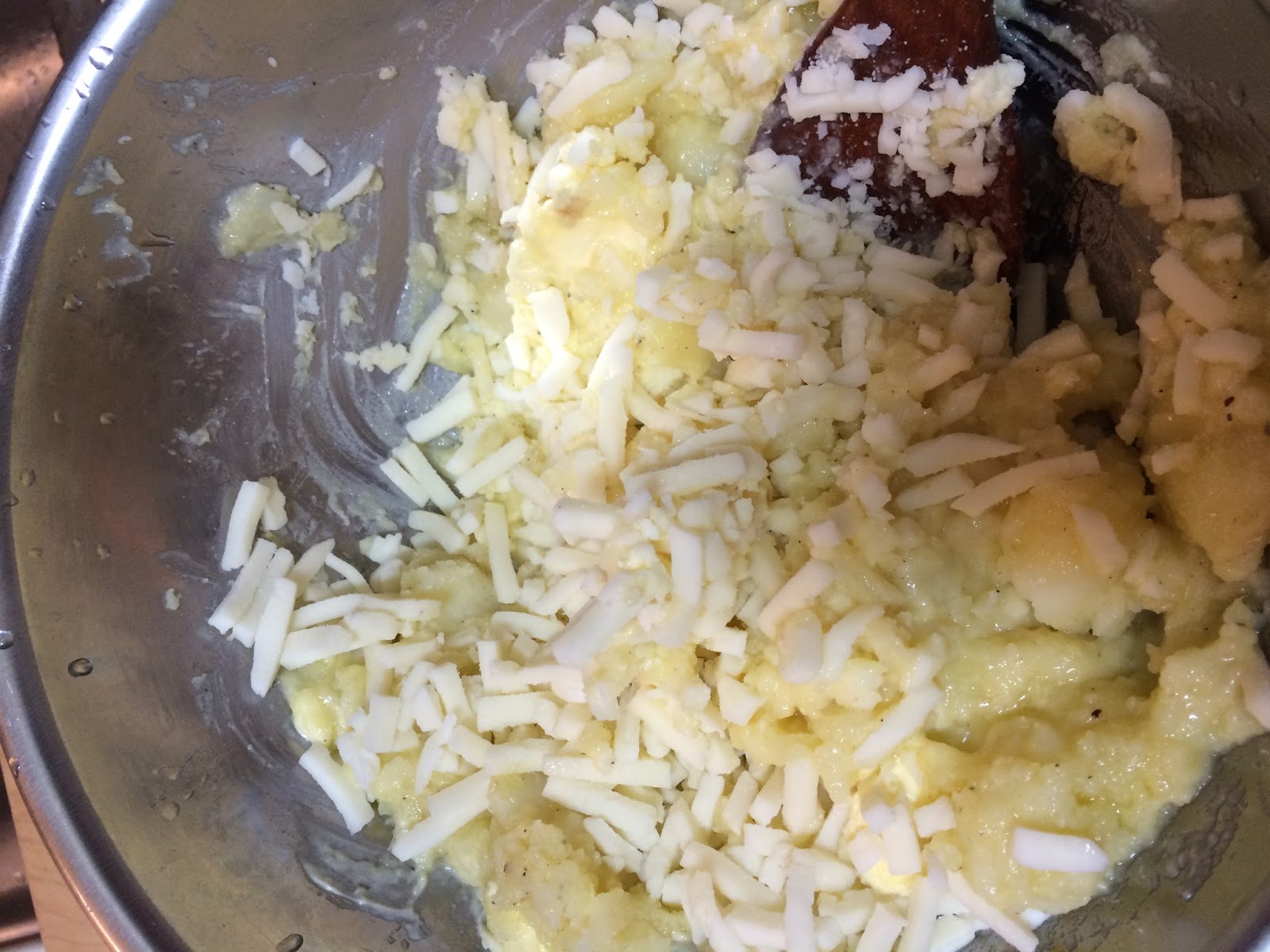
  2. Add a dash of pepper , a proper salt and a butter chip. then mix it until a butter me out of all.


  3. Add cut mozzarella cheese, canned corn without its soup and a grinded onion. and mix it.


  4. Make shape like a ball with the mixture. then, Roll croquettes on flour.


  5. Whisk croquette to another plate with egg water, roll mixture on the plate.
    then roll it on another plate with the breadcrumbs.
    Its sequence is good to keep.


  6. Dip croquettes in the deep frying pan over medium-high heat until it is floating.
  7. Finally. done.


2016-07-24

Windows Executive component function prefix

Windows Executive component function prefix


Pattern

<Prefix><Operation><Object>

ex. ExAllocatePoolWithTag

Prefix

Alpc = Advanced Local Inter-Process Communication
Cc = Common Cache
Cm = Configuration Manager
Dbgk = Debugging Framework for User-Mode
Em = Errata Manager
Etw = Event Tracing for Windows
Ex = Executive support routines
FsRtl = File System driver Run-Time Library 
Hal = Hardware Abstraction Layer
Hvl = Hyper visor Library
Io = I/O Manager
Kd = Kernel Debugger
Ke = Kernel
Lsa = Local Security Authority
Mm = Memory Manager
Nt = NT System Services
Ob = Object Manager
Pf = Prefetcher
Po = Power Manager
Pp = PnP Manager
Ps = Process Support
Rtl = Run-time Library
Se = Security
Tm = Transaction Manager
Vf = Verifier (Driver Verifier)
Whea = Windows Hardware Error Architecture
Wmi = Windows Management Instrumentation
Wdi = Windows Diagnostic Infrastructure
Zw = The mirror entry point for system service , similar to NT, but sets access mode to Kernel, which in turn eliminates any parameter validation. because, Only In the user mode, Nt system service validate parameters.


2016-07-21

The beef stew recipe

The beef stew recipe

Ingredients

  1. 100g Butter chip
  2. 2 Medium onions or more
  3. Proper amount of salt and black pepper
  4. 3 Medium tomatos
  5. 1 big carrot
  6. 15 Bay leaves
  7. 300ml Red wine

Steps

0. For eliminating a blood from the meat, You put it all into the big bowl littered with fresh waterfor around 30 minutes or over.

1. Remove the onion's , carrot's, potato's skin. then, Wash it with clean water


2. Slice the onion that all as possible as thin. It makes to help you cooking quickly.

3. Then , Stir sliced onions with melted butter until being color changed to light brown.


4. To the pan, add the meat blood removed. and, stir them with strong fire until pan will be filled with meat broth.


5. Dice carrots and potatoes. and, Cut the tomato each in 4 pieces.


 ※ you must not have to remove skin of tomato's. while you cook, it s going to be naturally.


6. Add all bay leaves , cut potatoes and cut carrots. and, Stir all of them for a while.


7. Add salt and pepper to taste, then, Add the wine and cut tomatoes.
   Boil down for a long time with low heat until be delicious-looking.


8.  In my case, done... it is over boiling down...
    But very thick and delicious.


2016-07-17

WinDbg Shortcut custermizing

WinDbg Shortcut custermizing for Kernel debugging


When we do a kernel debugging, Everytime, to type a sort of evirnoment settings such like port, keys, symbos and etc is very hard works and inconvenient.

So, you can make a shutcut to start winbg with that's all inconvenien.


Steps
  1. You can copy link file to your own path.
  2. Do right click > go on 'shortcut tab' 
  3. Copy and paste to target values with next example.

    In case of using networks.
    "C:\Program Files (x86)\Windows Kits\8.1\Debuggers\x64\windbg.exe" -y cache*c:\symbols;SRV*http://msdl.microsoft.com/download/symbols -k net:port=60000,key=suln6kbqs6x6.37m1nwn9s7hax.1nidtg54nvhxf.21ntp6ltnme6m 

    In case of using serial port.
    "C:\Program Files (x86)\Windows Kits\8.1\Debuggers\x64\windbg.exe" -y cache*c:\symbols;SRV*http://msdl.microsoft.com/download/symbols -k com:pipe,port=\\.\pipe\com_2008_0,resets=1,reconnect -c ".echotimestamps 1"
  4. And, update your own parameters, for example. symbol's path, key, port and so on.


Good luck!

2016-07-14

#4 아두이노 서보모터 사용해보기

#4 아두이노 서보모터 사용해보기


구성도


실제 구성


아두이노 스크레치 코드

가변 저항값 0~1023 을 서보 모터의 0~180º으로 맵핑하여, 가변 저항을 돌리면 서보 모터도 같은 각도로 움직 이도록 한다.


※ 가변저항 의 입력값은 0~1023 의 범위를 가진다. 따라서 디지털이 아닌 아날로그 핀으로서 읽어 들여야 한다.

source codes
#include <Servo.h>

int servoPin = 9;
int vrPin = 3;

Servo servo; 


int angle = 0; // servo position in degrees 

void setup() 
{
     Serial.begin(9600);
    servo.attach(servoPin);
     pinMode(3,INPUT);} 

void loop() 
{
   int value = analogRead(vrPin);
  Serial.print("value=");
  Serial.print(value);
  Serial.print(" ,");
  value = map(value, 0,1023, 0 , 180);
  Serial.println(value);
  servo.write(value);  delay(15); 
} 


동작시 출력값


서보 동작 원리

서보 모터의 설정 각도는 펄스의 HIGH가 유지되는 시간데 따라 0에서 180º 까지 설정된다.


※ Reference : http://wiki.vctec.co.kr/opensource/arduino/servocontrol